
Partly inspired by similar work I did for WorkerPool, I have now released untangle, a tool to detect and troubleshoot deadlocks in programs that use pthreads1 (which includes most C++ programs on Linux that use std::thread and std::mutex).
Deadlocks are a problem that we already have a number of ways to avoid:
- Design software carefully and follow best practices for your language and in particular the threading API.
- Keep things as simple as possible2, and test early and often.
- Use linters and static analyzers to ensure compliance with best practices.
- Use dynamic analyzers like ThreadSanitizer and Helgrind to discover bug-prone runtime behavior.
Sometimes, despite following the above advice (or because of neglecting to do so), developers can nevertheless encounter deadlocks in their applications. When a developer observes a deadlock, the best case scenario is that the cause and the solution are intuitively obvious with no additional information needed. However, while Helgrind’s documentation says “actual deadlocks are fairly obvious,” an actionable understanding of what has deadlocked and why may be far from obvious, and it gets less obvious the more removed you are from the design and creation of the buggy software. Indeed, even knowing when a deadlock has occurred at all is not obvious in a fully general scenario. Applications can do far more things at once than someone staring at a log file can keep track of, so how can one be expected to notice right away if thread #36 out of 50 enters a deadlock while other parts of the application appear to happily chug away?
The current state of the art in triaging deadlocks is to get the software into a deadlocked state (or hope that it is in one), then break in with a debugger and start looking around for clues. In the worst case, you have no foreknowledge of which threads are stuck, so you have to tediously review a stack trace for every thread in the application. Furthermore, reviewing stack traces is merely a starting point, as not every waiting thread amounts to a smoking gun. Likewise, even if you can determine that some mutex is being held too long, there’s no easy way to figure out which thread is responsible, since mutexes do not track their owners3. Overall, debugging deadlocks using existing tools is not impossible, but it’s harder than it should be.
I decided I wanted a tool that, at minimum, told me which threads are involved in a deadlock. What resulted is untangle, a shared library that instruments a few pthreads functions4:
pthread_mutex_lockpthread_mutex_unlockpthread_mutex_join
Through tracking which thread owns which mutex and what each thread is waiting for, untangle can detect a large family of deadlocks and explain them in plain English.
Deadlock gallery
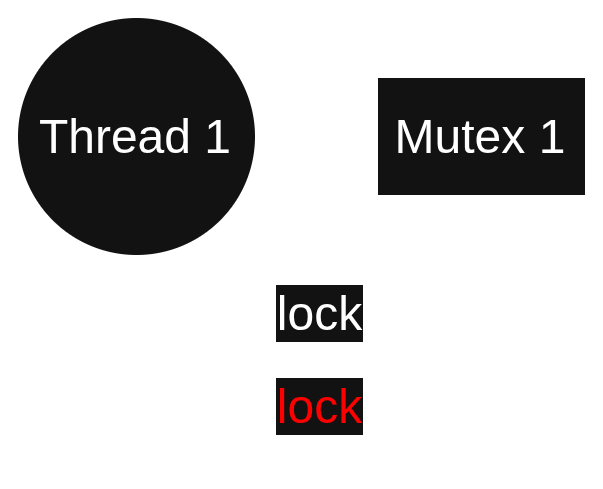
Time for some demonstrations. I wrote programs that caused a fun variety of deadlocks, which are represented below in schematic form. Edges are labeled with function calls. The call in red is the one that creates a deadlock. Next to each diagram is the message that untangle outputs when you run the program like $> untangle ./MyProgram. (The recommended way to use untangle is to debug: $> gdb --args untangle ./MyProgram.)
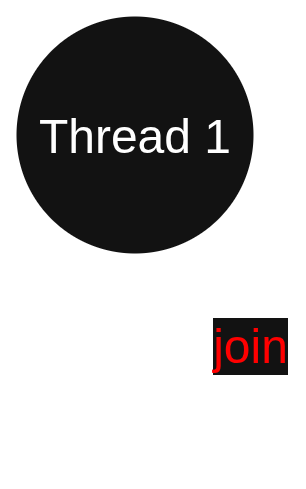
Thread “1” (0x7fca1649b780) created a deadlock by joining itself.
Thread “1” (0x7f08dcd19780) created a deadlock by waiting for mutex “1” (0x7ffc80d55180), which it already holds.
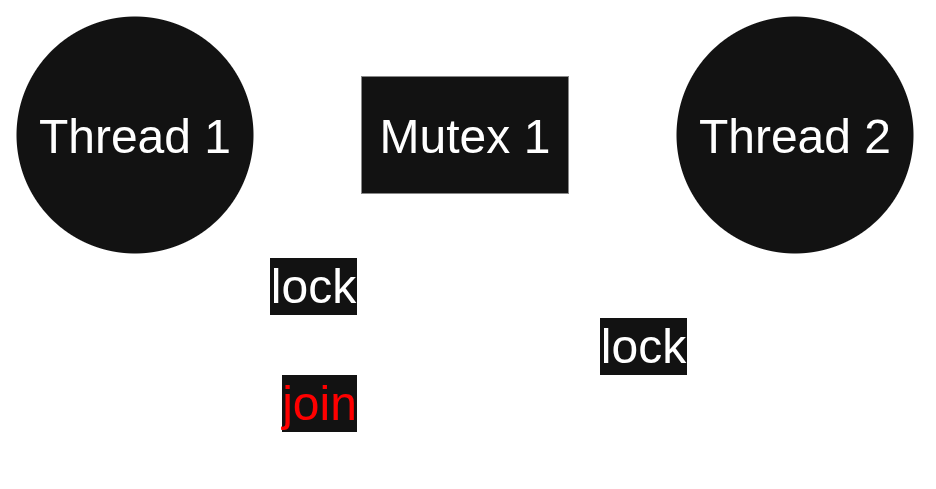
Thread “1” (0x7fabf82e6780) created a deadlock involving 2 threads by joining thread “2” (0x7fabf7d176c0):
Thread “2” (0x7fabf7d176c0) is waiting for mutex “1” (0x7ffd9c6f95e0), which is held by thread “1” (0x7fabf82e6780).
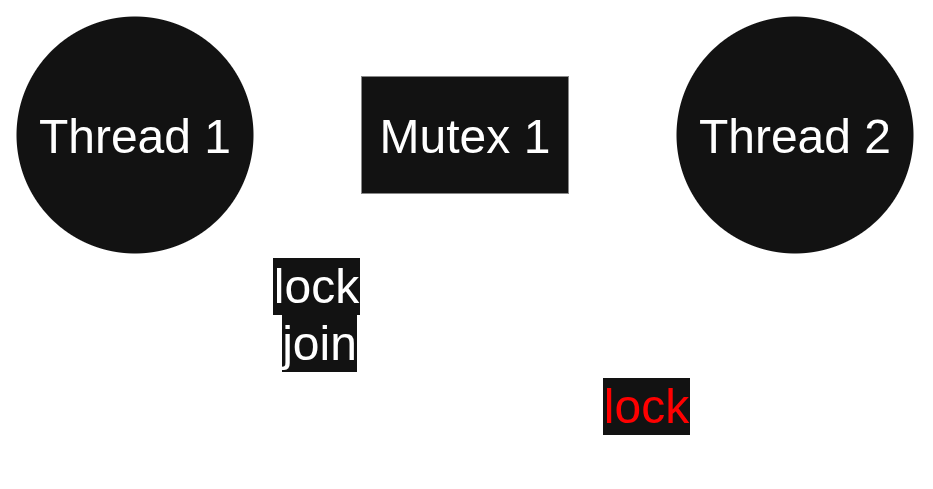
Thread “2” (0x7f00af60c6c0) created a deadlock involving 2 threads by waiting for mutex “1” (0x7ffee3964510), which is held by thread “1” (0x7f00afb1c780):
Thread “1” (0x7f00afb1c780) is joining thread “2” (0x7f00af60c6c0).
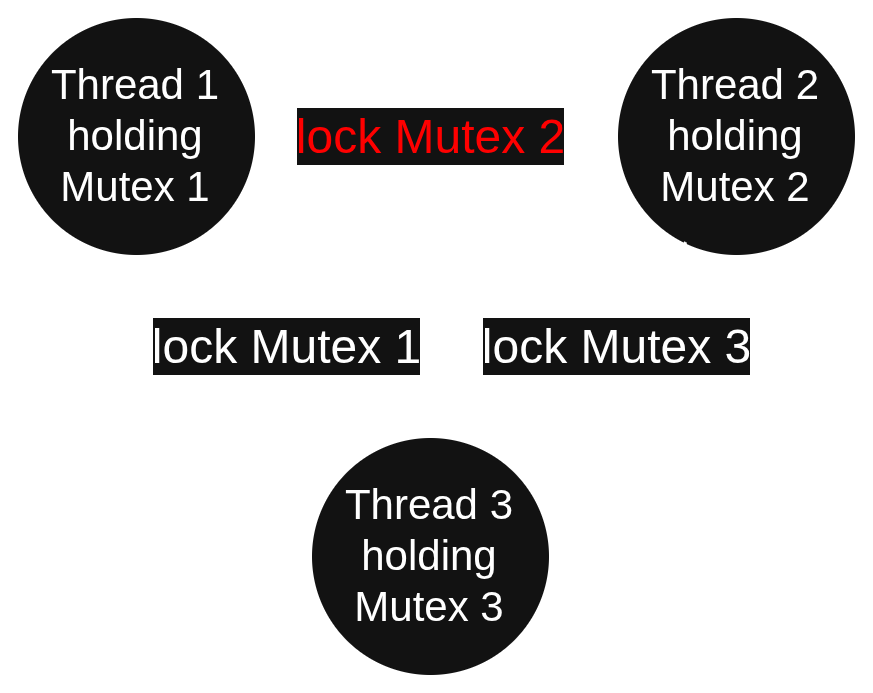
Thread “1” (0x7fb2fef176c0) created a deadlock involving 3 threads and 3 mutexes by waiting for mutex “2” (0x15ecc68), which is held by thread “2” (0x7fb2fe7166c0):
Thread “2” (0x7fb2fe7166c0) is waiting for mutex “3” (0x15ecc90), which is held by thread “3” (0x7fb2fdf156c0).
Thread “3” (0x7fb2fdf156c0) is waiting for mutex “1” (0x15ecc40), which is held by thread “1” (0x7fb2fef176c0).
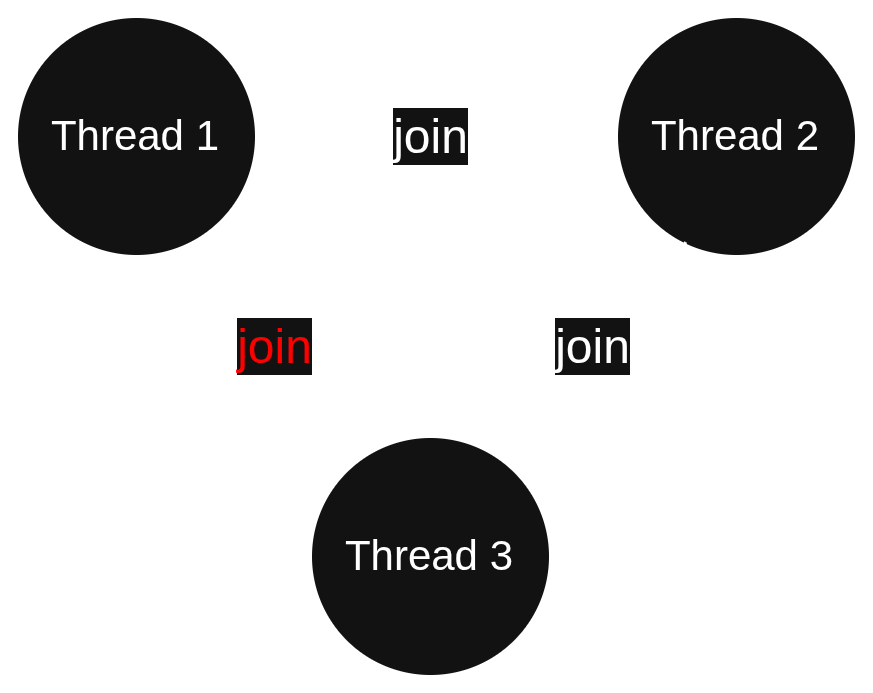
Thread “3” (0x7f3dc29156c0) created a deadlock involving 3 threads by joining thread “1” (0x7f3dc39176c0):
Thread “1” (0x7f3dc39176c0) is joining thread “2” (0x7f3dc31166c0).
Thread “2” (0x7f3dc31166c0) is joining thread “3” (0x7f3dc29156c0).
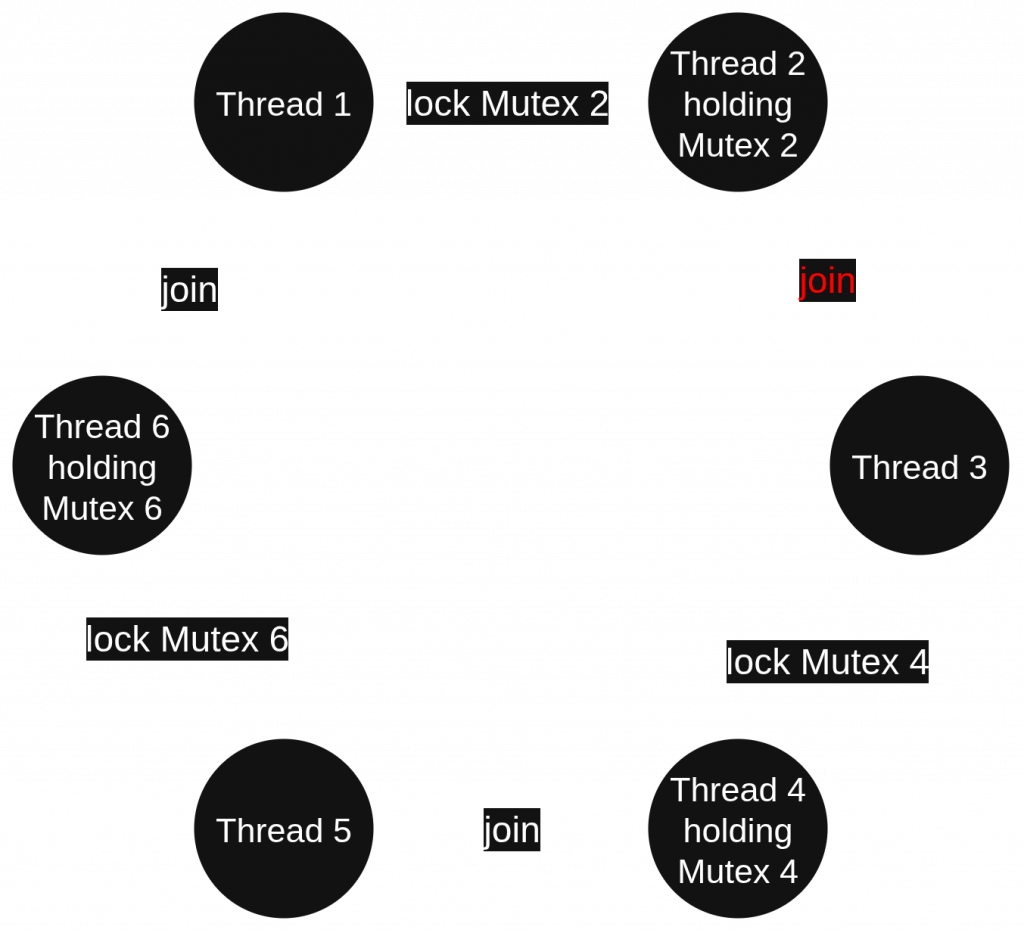
Thread “2” (0x7f36a2c0b6c0) created a deadlock involving 6 threads and 3 mutexes by joining thread “3” (0x7f36a240a6c0):
Thread “3” (0x7f36a240a6c0) is waiting for mutex “4” (0x23063cb8), which is held by thread “4” (0x7f36a1c096c0).
Thread “4” (0x7f36a1c096c0) is joining thread “5” (0x7f36a14086c0).
Thread “5” (0x7f36a14086c0) is waiting for mutex “6” (0x23063d08), which is held by thread “6” (0x7f36a0c076c0).
Thread “6” (0x7f36a0c076c0) is joining thread “1” (0x7f36a340c6c0).
Thread “1” (0x7f36a340c6c0) is waiting for mutex “2” (0x23063c68), which is held by thread “2” (0x7f36a2c0b6c0).
What else does untangle do?
Upon detecting a deadlock, it writes a message like the above examples to stderr and raises SIGTRAP. A debuggee can override the output destination by calling untangle_set_writer. If GDB is attached, this signal will break into the debugger; otherwise it’s likely to just kill your process5. The point where the signal is raised will be in series with the call to lock or join that completed the deadlock, so you can start getting useful information immediately by doing a backtrace and hopping around to the other threads mentioned in the untangle message.
Thread and mutex names
Thread and mutex names can be used to make the messages prettier, but they aren’t required by any means.
untangle uses pthread_getname_np to get thread names, so you should use pthread_setname_np to set them. If the debuggee doesn’t have useful thread names, then you just use the number in parentheses as the thread identifier.
For mutex names, the debuggee has to call untangle_set_mutex_name. Most debuggees won’t do this, since it will require (re)compiling against untangle‘s headers (#include <untangle/untangle.h>) and likely also linkage with -luntangle. If untangle doesn’t have a name for a mutex, you’ll just have the mutex’s address to go by. This is fine anyway, since you can easily find the mutex’s name in source code if you’re debugging with symbols: Either the thread that traps will be inside a call that attempts to lock the offending mutex, or some other thread will be, which will be stated in the untangle message.
- POSIX defines a fairly extensive threading API, though
untangleis only concerned with deadlocks you can cause by locking mutexes and joining threads.untanglegenerally does not check for other kinds of pthreads errors. ↩︎ - (But no simpler!) ↩︎
- A mutex implementation may track owners, but C++ mutexes on Linux usually do not. ↩︎
- I also instrument
pthread_mutex_initandpthread_mutex_destroy, but not to do anything important. I mention these only for completeness. ↩︎ - Exiting on SIGTRAP may trigger your system’s crash reporter. ↩︎